
Showing posts with label Windows. Show all posts

How to Overcome Slow Boot Process

>> Tuesday, December 28, 2010

Usually the time needed to boot the computer since switched to the Windows desktop appear shortly, which is about -25 seconds, depending on hardware and applications used. If the boot process is slow, there may be problems with the hardware or the applications that we install on the computer.

To overcome these problems, there are some hardware or software modifications to be done. To modify the hardware, make sure the hard disk that contains the operating system located on the primary master, and another hard disk on the primary slave position. For SATA type hard disk, put the hard disk that contains the operating system at the earliest position (SATA 0 /1).

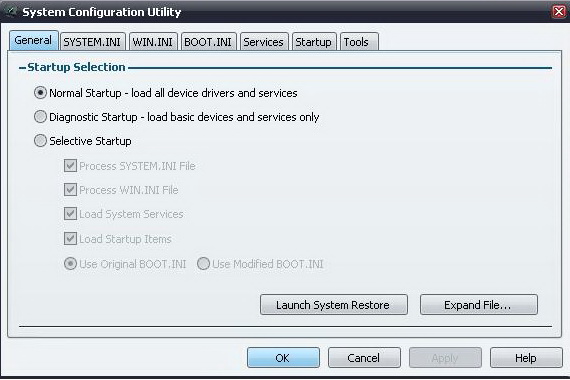
If the computer specification that is used is good, but the boot process is still slow, usually caused by too many programs that are uploaded at startup. It also can make computer memory intensive. To overcome this, perform the following steps:
  • Close all running applications
  • Click Start> Run, then type msconfig and press Enter to display the System Configuration Utility dialog box
  • Click the Startup tab in the dialog box. A check mark that appears is a list of active programs since Windows is started. If the numbers quite a lot. Remove some of the check program is needed at startup, such as e-mail client, messengers, and Microsoft Office startup
  • Click Apply> OK to activate the settings. Then click Yes on the confirmation to restart your Windows system. Control list of startup programs on a regular basis for memory usage system properly maintained.
Read more...

New Features Of Windows 8 The Immediate at Launch

>> Saturday, October 16, 2010

The company this one is truly outstanding, the manufacturer who issued the Microsoft Windows operating system recently launched its newest product, namely Microsoft Windows 7. Have not these people use Windows, Microsoft plans to re presents Windows operating system 8, these windows will be better than Windows 7 is now.

According to the source Windows 8 is much better than windows which are now in the market. As we know Windows rot a condition where windows operating system is slowly degenerating into slow, soggy conditions after installing lots of applications, uninstall, and other things that accumulate in the system from time to time.

The people who perform good maintenance practices in the computer to help keep the installation of Windows run better, longer, but it does happen to everyone. Action re-format and / or reinstall to make things feel new again, even on old hardware. And now it seems Microsoft will build internally reinstall feature to Windows 8.

As seen in some of the leaked presentation slides, Microsoft could have a recovery option to reset Windows while retaining all personal files and user accounts. One presentation showed pictures option to reinstall all applications that have been purchased from Microsoft's App Store.

Here's a screenshot of Windows 8, which immediately launched.


Source:www.tomshardware.com

Read more...

System Explorer Operative System: XP / Vista / 7

>> Friday, August 13, 2010

System Explorer provides information about Tasks, Processes, Modules, Startups, IE Addons, Uninstallers, Windows, Services, Drivers, Connections and files are open. Find details about file / process via online databases. Action History for monitoring processes activities. Performance graphs for monitoring usage of system resources in time. And the best feature is the ability to check the file through VirusTotal or Jotti system, simply right-click to do so.

This software is very unusual because when we suspect a file or process that runs on our computers, we can take a look through the site or VirusScan.jotti.org VirusTotal.com only with right click.

How do I use it :
  1. Extract Dolo SystemExplorerPortable.zip file by right click and select Extract Here
  2. Run SystemExplorer.exe
  3. Click I Agree
  4. If there appears a window 'Welcome to SystemExplorer! Do you want to automatically run the System Explorer after system startup? 'Select Yes if you want this software running when the computer restart / restart. Select No if you do not want this software automatically runs when the computer in turn;
  5. 5. Will appear GUI (display applications) System Explorer 2.1.1.2828 (until this step, it all depends on you.
Please test your own software with your notes to know what you are doing. Click the Help and select the Online Help for further assistance regarding this software.

In order to use System Explorer you have to meet the following system requirements:
* Operative System: XP / Vista / 7
Minimum System Requirements:
* Pentium® III 700 Mhz / RAM: 128 MB

Date: 2010-04-08 Web: www.tortoisesvn.net Licence: Freeware Language: Multilanguage Size: 2 Mb Downloads 1387

Read more...

Small Registry Editor-Windows Registry

Small Registry Editor is an alternative application of the default Windows Registry Editor (Regedit). Why Small created the Registry Editor? No other, no not is because sometimes Regedit can not be used when systems are infected with the virus. These are strong reasons for the creation of Small Registry Editor.
Viruses can not do blocking on S.R.E. therefore, we can make improvements registry (especially professionals) if our computer system is infected with a virus that did Blocking Regedit.SRE very useful when we try to clean the virus from our computers that have blocked the Regedit.

Minimum Usage: Windows 2000/XP/2003/Vista/7
Current release: Version 1.3.1.12 (beta)
Download Size: 167 Kb
Download

Read more...

Manage System Restore With the Restore Manager 1.0

>> Tuesday, August 10, 2010

Manage System Restore. Software or system instability can be caused by damage or installation errors. To seek improvements to easily and quickly, usually the user use the system restore feature which is owned windows. To complement the standard features of Windows are limited to system restore, a user can use additional software known as "System Restore Manager"

This software is able to easily manage restore points, and provides several options for customizing. Users can make changes to the default values defined by Windows, including the interval of time to live a restore point, and the total maximum capacity That simple interface lists all the restore points are so simple to manage
contribute a better translation, including the creation, deletion, and execution of a restore process point.

Price: Free
File Size: 372.61 KB

Read more...

How to Restrict Use of Memory With Software

>> Monday, August 9, 2010

Sometimes when running lots of software, our computers seem slow. You'll want to know the software which uses the most memory? To monitor, you can use "Task Manager" windows default. But if you are not familiar with it, you can try using this one software.

Software was named Kiwi Application Monitor is a small software that can be used to monitor the work process an application. This software works by collecting data about how long a piece of software running, memory usage, and CPU usage. This software can also monitor the burden of computer memory, windows, and user activity.

In addition, this software will also allow you to set priorities in the use of RAM by software. One of the interesting things, this software provides a facility that allows you to limit the amount of memory may be used by any software. In effect, this software will give you a sign when one of software use beyond that has been applied to memory.

Price: Free
File Size: 358.61 MB approximately

Read more...

Visual Software Downloads For Windows

>> Sunday, August 1, 2010

Visual Software Under Windows. SkinStudio is a software that allows you to change the visual styles in Windows, when applied with WindowBlinds. Skin can be used on Windows XP, Vista, and Windows 7. SkinStudio 7.1 with this you can change title bars, borders, push buttons, scrollbars, Star Bar, Start menu, and almost every other part of Windows Operating GUI.

SkinStudio is software that is provided free of charge. In addition to the free version, there is also a Pro version for more of the features for free, while for the pro version is more complete, such as builders to load the start menu animation, syncing substyle, and many others. SkinStudio Pro is available separately or with a subscription to Object Desktop.
  1. Updates for the new font choice on the WB 7.1 beta
  2. Updated for WindowBlinds 7.1 supports new features in Windows 7
  3. Control over the color of the background on the area of the Windows folder 7
  4. Control over the color of the text in the preview area below the windows Explorer in Windows 7

Further information, including download links, available at www.skinstudio.net

Read more...

Registry Cleaner To Use With Windows 7

>> Wednesday, March 24, 2010

Unlike other Windows systems, Windows 7 has been designed to be as up-to-date and feature-rich as possible. It has a lot of new features, applications and files which many older registry cleaners will not recognize and will struggle to fix, meaning that if you want to be able to make your computer run much faster and more reliably, you need to use the registry tool that is completely compatible with Windows 7.

There are a lot of Windows registry cleaners out there, but only a few work well on Windows 7. Although there are a lot of tools on the Internet, they have all been designed to do the same job... and it's how well they do this job which will determine how effective they are.

The job of a registry cleaner is to clean out all the damaged and corrupt registry settings from Windows. Registry settings are files that are stored inside the registry database and help your computer to 'remember' a variety of different options for your computer. Unfortunately, the registry is prone to becoming corrupt and damaged, making Windows unable to read the files it wants to in a suitable time.

Because Windows 7 has a lot of new features & settings inside the registry, a lot of older registry tools are unable to do their job properly on it. They work by scanning through every registry file on your PC and identifying any damaged or corrupt ones that are in there. The problem is that if you use an outdated registry scanner on Windows 7, it's going to label a lot of the new registry files that this system has as being damaged or corrupted, when they are not. This will make your PC try and remove many healthy registry settings, which will cause havoc with Windows.

The best registry cleaner to use with Windows 7 is the one which is able to find and remove the largest number of registry errors, whilst leaving all the healthy registry files intact. There are only a few registry tools which are updated and effective enough to perform well on 7, but having used a lot of these, we've found that one called "Regcure" has been the best. RegCure is a popular registry cleaner and is effective on Windows 7 because it's been kept up to date and tweaked by its large parent company.

Read more...

  © Blogger template Werd by Ourblogtemplates.com 2009

Back to TOP